Release notes for the SpineWise Pro Kit App
v0.13.1 - 2025-01-10
New features
- Time display: Added the recording time to measurements to clearly distinguish between measurements taken on the same day.
- Sorting: Sorting based on recording date and time for a better chronological display.
Bugfixes
- Walk detection: Due to a faulty configuration, walk detection was often too restrictive; this has now been fixed.
- Race conditions: Resolved race conditions when creating folders in the backend.
Technical improvements
- Logging: The logging level is now higher and logging of serial device communication was reviewed, to keep only relevant logs.
- Device communication: Stable communication with connected wearables by adding a queue and limiting parallel communication per port.
v0.12.0 - 2025-08-27
New features
- Quickly see whether a measurement is good: Colour indicators with a short explanation on the measurement cards help you spot problems (e.g. incorrect calibration) at a glance. See the measurement page.
- Measurements grouped by date: Files are grouped per recording date, so you can browse your recordings faster. See the measurement page.
- Choose firmware per type: Updating goes more smoothly with clearer warnings for an incorrect combination. See device management.
- Clear firmware status: Non-standard versions are allowed and clearly marked, so you can keep working without confusion. See device management.
- Vibrations on/off: New "Vibrations" toggle to control buzz feedback from the wearable. See device management.
- Clear units in settings: Units are shown next to fields, so you can choose the right values more easily. See device management.
- More readable charts: Zones in the horizontal bar chart get patterns that are also clearly visible in prints. See the measurement page.
- Quick KPI summary: Cards show key figures per file to help you decide faster which measurement to open.
Improvements
- New naming for flexion and extension zones: Because of confusion with the traffic-light model for the number of dynamic movements and the time spent in certain zones, the flexion and extension zones are now divided into zone 1 through zone 4. See the section on Measured parameters.
- More accurate movement recognition: Walking and squat are recognised better with fewer false alerts. See measured parameters.
- Tidier measurement cards: Calmer layout, description displayed neatly and easier editing/adding. See the measurement page.
- Faster actions on the measurement page: Files are sorted within each date and deleting/updating can be done directly on the card. See the measurement page.
- Smoother firmware updates: The app picks the correct latest release per type and gives clear warnings on a type mismatch. See device management.
- Safer device configuration: Buttons are temporarily disabled during loading/saving, the current preset is recognised, fast copying of the configuration to the clipboard; internal options only visible with the right permission. See device management.
- Smoother refreshing: Lists and cards respond faster and show more clearly when a refresh is happening.
- More reliable uploads and sign-in: Uploads stay valid longer and logging has improved, which reduces failures.
Bugfixes
- Safer flashing: "Reset configuration after flash" only appears where needed; clear warnings on the wrong type choice; "Universal" only in test environments. See device management.
- Permissions and visibility: Internal device settings are hidden without the right permission; stray debug logs removed.
- Text improvements: Improved translations and support messages.
- LED hub reliability: Time is synchronised consistently on connecting and logging has improved.
- Consistent lists and sharing: Improved pagination and tenant names ensure predictable overviews and sharing.
v0.9.0 - 2025-02-19
New features
- Wearable configurations: Ability to adjust the configuration of the measurements and the vibrations of the wearable (e.g. vibration on/off, record curvature yes/no, alpha angle, ...). For more information and access to extra configurations, contact us at
info@spinewise.be. - File pause and selection: An interface for file management on the wearable has been added. In addition, a setting is available to automatically download files from the wearable as soon as it is connected (default: on).
- Sharing with other users: It is now possible to share files between users. Ask the recipient to share their user ID via "My account". With this you can share files via the "Share" button.
- Automatic anomaly detection: A warning appears if the data deviates significantly from a normal measurement. This often indicates an incorrect calibration or a considerable rotation of one of the wearables (e.g. the belt wearable has rotated since calibration). (Note: this may be triggered incorrectly during measurements with a lot of sitting activity.)
- Automatic driver installation: The driver for the wearable is now included in the installation, so a separate download and manual installation are no longer needed. (This does now require Administrator rights during installation.)
- Measurement description: Ability to add a description to a measurement with formatting options.
Improvements
Improvements
- Improved display of connected devices: Spine wearable pairs (neck and belt) are now shown together, making them easier to tag and identify.
- Improved data transfer to the SpineWise portal: Reliability increased and the ability added to import only selected zones.
- Improved performance: Analysing a file now takes 50% less time.
- Squat improvements: The squat algorithm has been significantly improved, with fewer false detections and more accurate predictions. Give it a try and let us know!
- Torsion improvements: The torsion algorithm has been optimised with new filters to reduce false detections.
- Improved update process: Stability increased and a manual button added to check for and download updates.
- Improved certificate check: No more security warnings during installation.
Bug Fixes
- Layout-resize bug and the ability to change the configured name.
- Issue with the session ID when requesting support.
- Retaining the chart zoom after selecting a range.
v0.7.1 - 2024-09-21
New features
- Automatic wearable updates: Added an option in the settings to enable automatic updates for wearables on connection.
- Improved chart visualisations: Excluded zones can now be set and shown in charts, and movement charts include new patterns for better data interpretation.
- Wearable configurations in KPIs: Wearable configurations are now shown in KPI popovers for a better overview.
- Language additions: First FR and DE translations have been added; these still need to be improved and the documentation translations still need to be added.
- Cloud storage for custom names: Custom dataset names are now stored in the cloud, ensuring consistency across devices.
Improvements
- Simplified time selection: You can now select time periods directly in the TimeBarChart without opening the menu; press the Escape key to cancel selections.
- Overreach configuration in PDF export: Overreach configurations are now included when printing analyses.
- User interface improvements: Introduced a separate documentation button and raised the app's initial permissions for better accessibility.
Bugfixes
- Saving custom names: Fixed issues where custom names were not saved or were formatted inconsistently.
- PDF export: Fixed translation issues when exporting to PDF and hid redundant buttons in print mode. Addressed issues with printing to PDF in production environments.
- Improved error handling: Filtered unnecessary error messages related to unresolved data and disabled PDF printing when it was not applicable.
- macOS-specific fixes: Fixed various macOS-related (coming soon!) issues, including build errors and the display of application icons.
- Handling of large files: Improved stability and performance when managing more than 100 files.
- Connection stability: Fixed false error messages that occurred during connection loss or prolonged use of the app.
v0.6.1 - 2024-08-07
New features
- Improved torsion algorithm: The new version of our Torsion model is much more accurate and now counts one movement for the back-and-forth motion.
- Improved squat detection algorithm: The new version of our Squat detection algorithm is much more accurate. Crouching is no longer predicted, because it is too similar to squatting.
- Vertical and horizontal zoom in charts: Added the ability to zoom vertically and horizontally on charts with the CTRL key or CTRL+SHIFT keys.
- Support for multiple charts: Users can now select multiple charts with different legend selections and visualise them side by side.
- Default charts on the measurement page: Default charts are now shown on the measurement page for quick insights.
- Static postures and time in zones: Static postures and the various zones can now also be added to the charts.
- Tenant sharing: Added support to share analyses with the SpineWise Portal for aggregated data analysis.
- Zone selection: Added the ability to select one or more areas of the timeline, so that the KPIs apply only to those selections.
- Improved UI for wearable configuration: Users can now configure wearables better within the app (feel free to drop a note to info@spinewise.be if you want access to more configuration options).
- Pagination for the measurement page: Added pagination to the measurement page for easier navigation through measurements.
- Automatic Y-axis scaling: Automatic scaling of the Y-axis to the alpha/beta range for better visualisation.
Improvements
- Adding Last Modified and Processing timestamps: Introduced timestamps to track the last modification and processing times of data to reduce unnecessary reloading.
- Error handling: Adjusted error-handling mechanisms for a smoother user experience.
- Input validation: Improved validation for various input fields to prevent errors.
- Faster retrieval of processed data: Optimised the retrieval process for processed data files, resulting in faster performance.
- Dynamic counting of static timestamps: Implemented dynamic counting of static red, orange and overreach timestamps.
- Filtering KPIs by chart selection: KPIs are now filtered based on the selected chart for more relevant data display.
- Chart responsiveness: Improved the responsiveness of charts so that they resize correctly.
- Environment variable checks: Updated the environment example and added checks for required environment variables.
- Chart rendering optimisation: Moved chart rendering to separate components for better performance.
- Direct JSON retrieval: Updated data retrieval to fetch JSON files directly instead of the parquet format.
Bugfixes
- Delay in PDF generation: Reduced delay when generating PDFs.
- PDF print UI: Fixed issues with the UI when printing PDFs.
- Minor adjustments: Made various minor adjustments to improve overall stability.
- Null check on endpoint: Added null checks to the post file-info endpoint to prevent errors.
- SAS token path: Ensured full path inclusion for SAS token-based API calls.
- More than 100 files: Fixed issues with processing more than 100 files.
- Display of selection annotations: Changed the display method for selection annotations.
- Progress calculation: Fixed progress calculation to give accurate feedback.
- Translations of chart control buttons: Improved translations of chart control buttons for a better user experience.
- Removed logs and alerts: Removed unnecessary logs and alerts from the code.
v0.4.4 - 2024-04-22
New features
- Automatic login: Automatic login when starting the application, so that clicking "Log in" is no longer needed.
- Start maximised: The application now starts in a maximised window by default.
- Extra translations: An option for extra translations has been added in the device configuration settings.
- PDF export: Users can now export PDFs of their analyses.
- Movement recognition feature flags: Added torsion, crouching and squatting feature flags to provide extra insight into the recording. Contact us if you would like access to the alpha versions of these algorithms.
- Firmware updates of the wearable: Improved way to offer firmware updates of the wearables.
- Feedback form: A feedback form has been added that includes the session ID for better support tracing.
- Progress bar during downloads: Added a progress bar during downloads to give visual feedback on progress when downloading multiple recordings.
- Code signing certificate: You no longer receive a security warning when installing the software.
Bugfixes
- Error message on logout: Fixed an error message that appeared on logout.
- Forgotten password: Fixed issues with the forgotten-password page.
Improvements
- Handling multiple calls: Improved the handling of multiple calls for user data or file processing to increase stability and efficiency.
How to update
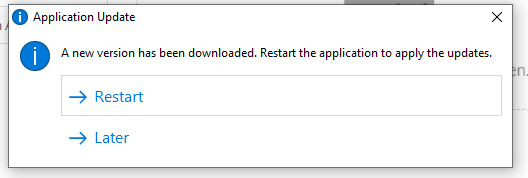
Updates are installed automatically in the background. A pop-up appears when the new version is ready, asking you to restart the application. After the restart you are working in the new version!